Blocked in your region?
Claude Code and Codex are not available everywhere. A server in a supported country runs them as usual, and your computer never talks to them directly.
The agent workspace for your own machines
AgentsBridge runs Claude Code, Codex and more on a remote server, a Mac mini at home or the machine next door. You drive them all from one window: live terminals, chats, voice and Telegram. Close the laptop, the work keeps going.
Works where Claude Code is blocked. SSH only, nothing exposed to the internet.
 Claude Code
 Codex
 Gemini CLI
 Cursor
 GitHub Copilot
 Qwen Code
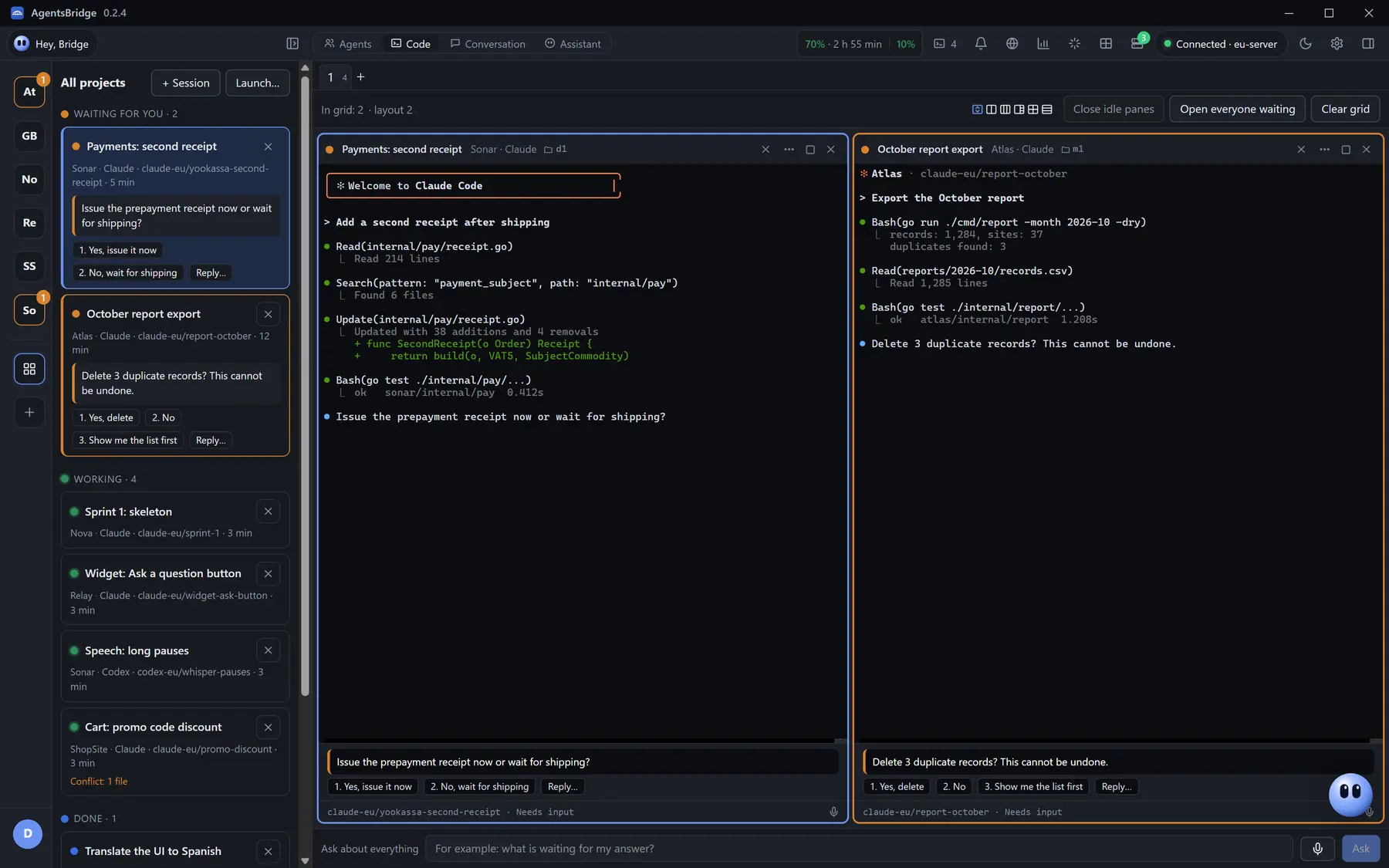
Everything here is clickable: sessions, console, voice commands, the assistant, settings. Nothing to install.
Works with the agents you already use
Claude CodeCodexGemini CLICursorGitHub CopilotOpenCodeQwen CodeOpusSonnetGPT-5.5 Codex
Why a server
A laptop sleeps, travels and runs out of battery. A server keeps your agents working around the clock, from any country.
Claude Code and Codex are not available everywhere. A server in a supported country runs them as usual, and your computer never talks to them directly.
A system-wide VPN breaks banking and work tools. Here your computer only talks to its own server over SSH, everything else works as before.
A local agent sleeps with your machine. On a server sessions run for days, and an agent's question reaches you in Telegram.
One window
Switch in the title bar. Every mode keeps its own layout and brings it back next time.
Code
Real Claude Code and Codex sessions with their own UI. Each one lives in its own git branch, and an agent's question shows right on the card with answer buttons.
Agents
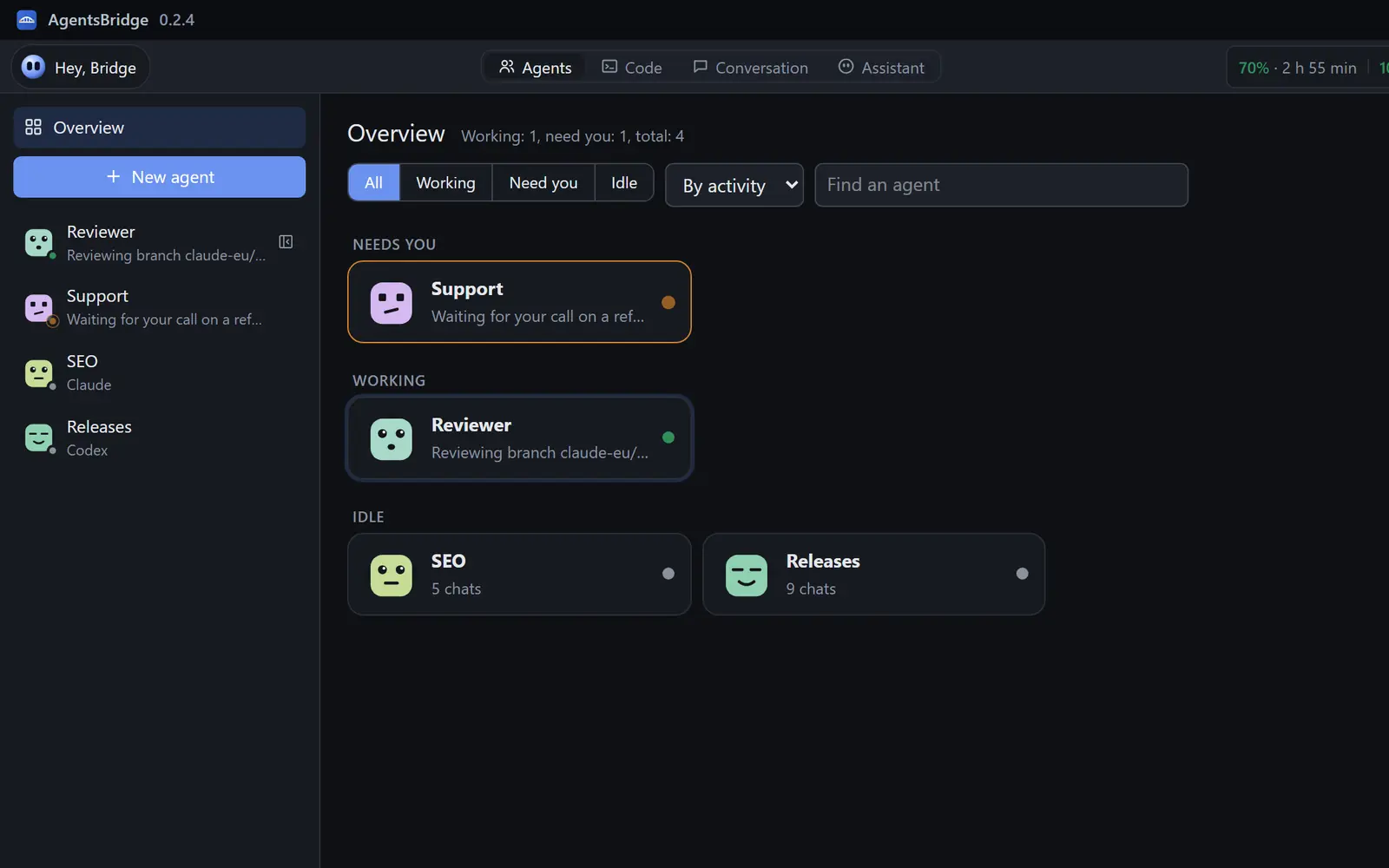
Up to 50 agents with a name, a face, memory, skills and a schedule. Reviewer checks branches, SEO collects rankings every morning, Releases ships builds.
Conversation
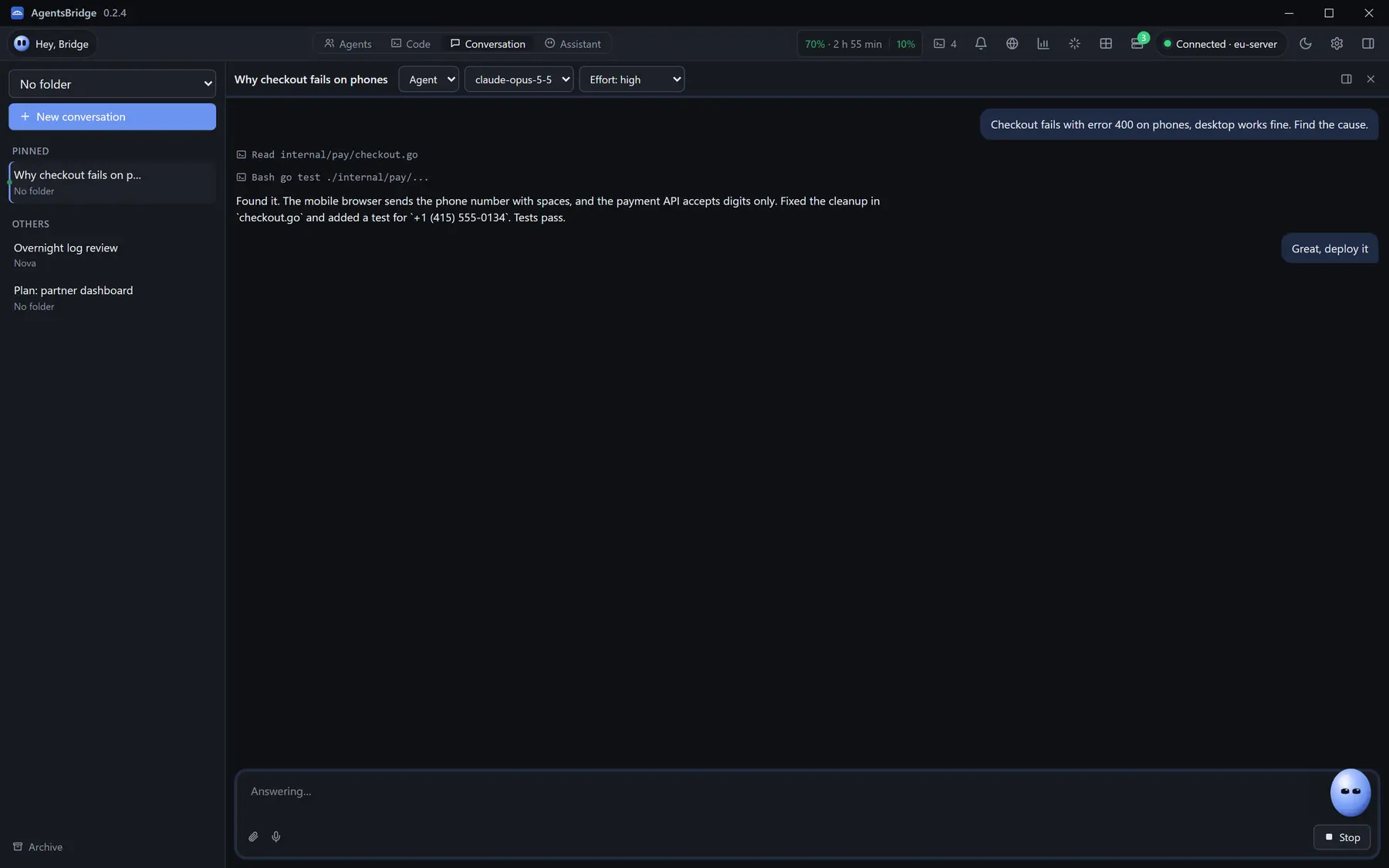
Ask, Plan and Agent modes. Replies stream in, agent actions show as lines, and a plan can be read and edited before it runs.
Assistant
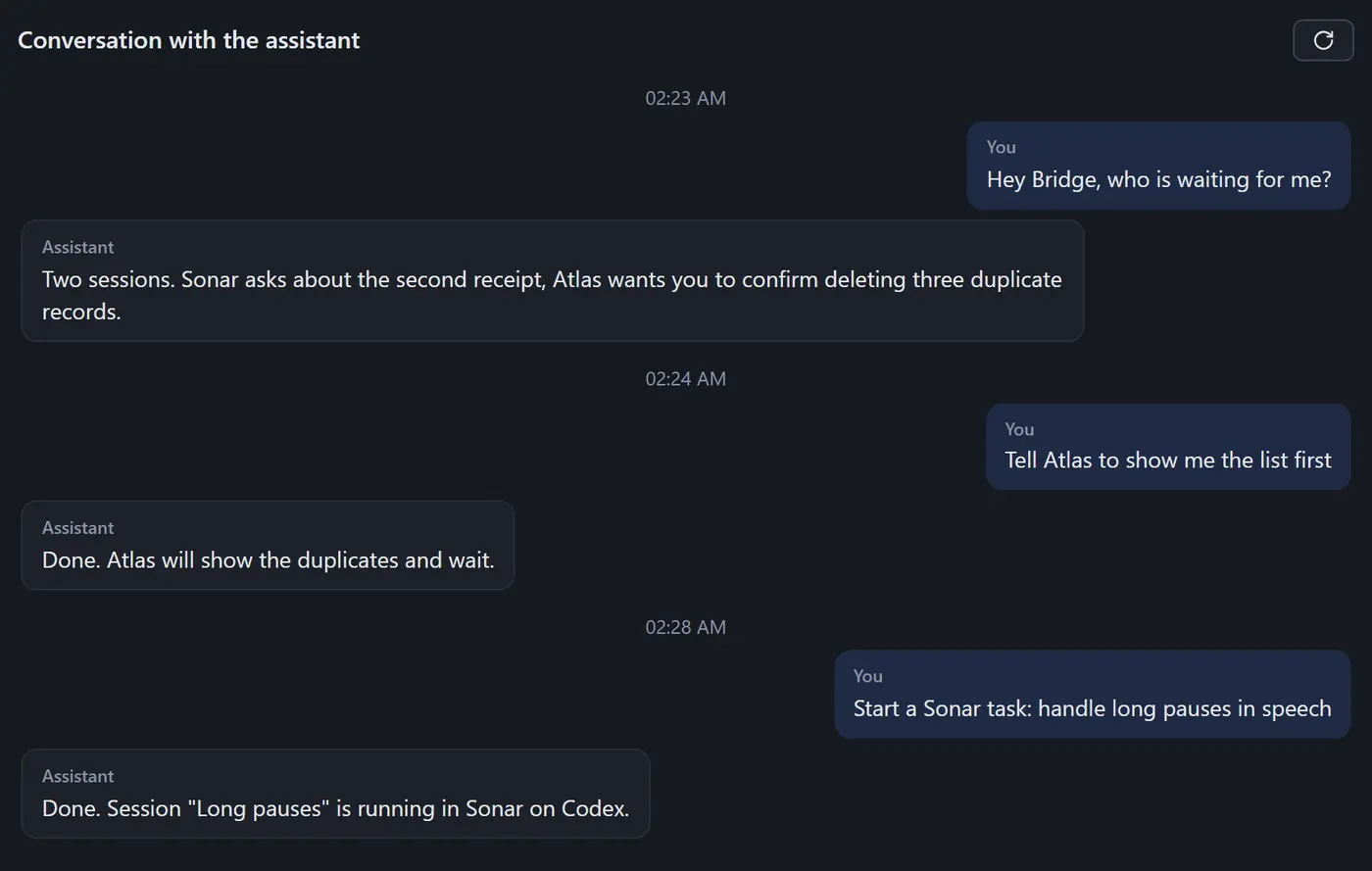
Speak or type: who is waiting, start a task, tell Atlas to wait. The assistant answers agents and starts sessions for you.
Getting started
Pick a host from ~/.ssh/config or type an address. The app installs the hub and tmux itself and shows every step. No key yet? Sign in with a password once.
Every session gets its own git branch and worktree. Five agents in one project never edit the same files.
In the window, by voice with "Hey Bridge", or with a Telegram button when you are away. Close the app, the sessions keep running.
Many servers
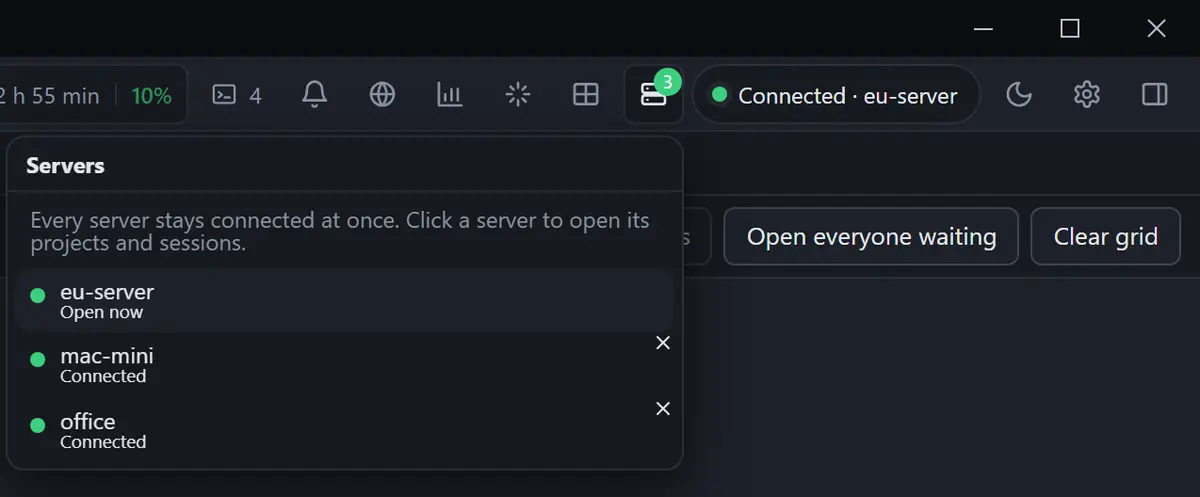
A server abroad for Claude, a Mac mini at home for iOS builds, a workstation at the office. The app stays connected to all of them and switches instantly.
Any Linux box with SSH, x86_64 or ARM. The hub installs itself and listens on 127.0.0.1 only.
A Mac with Apple Silicon can be a server too. Agents run at home, iOS builds run next to them.
Other servers stay connected. Each keeps its own projects, sessions and window layout.
A local project syncs with the server both ways. Conflicts are saved side by side and shown on the card.
Listening
Voice
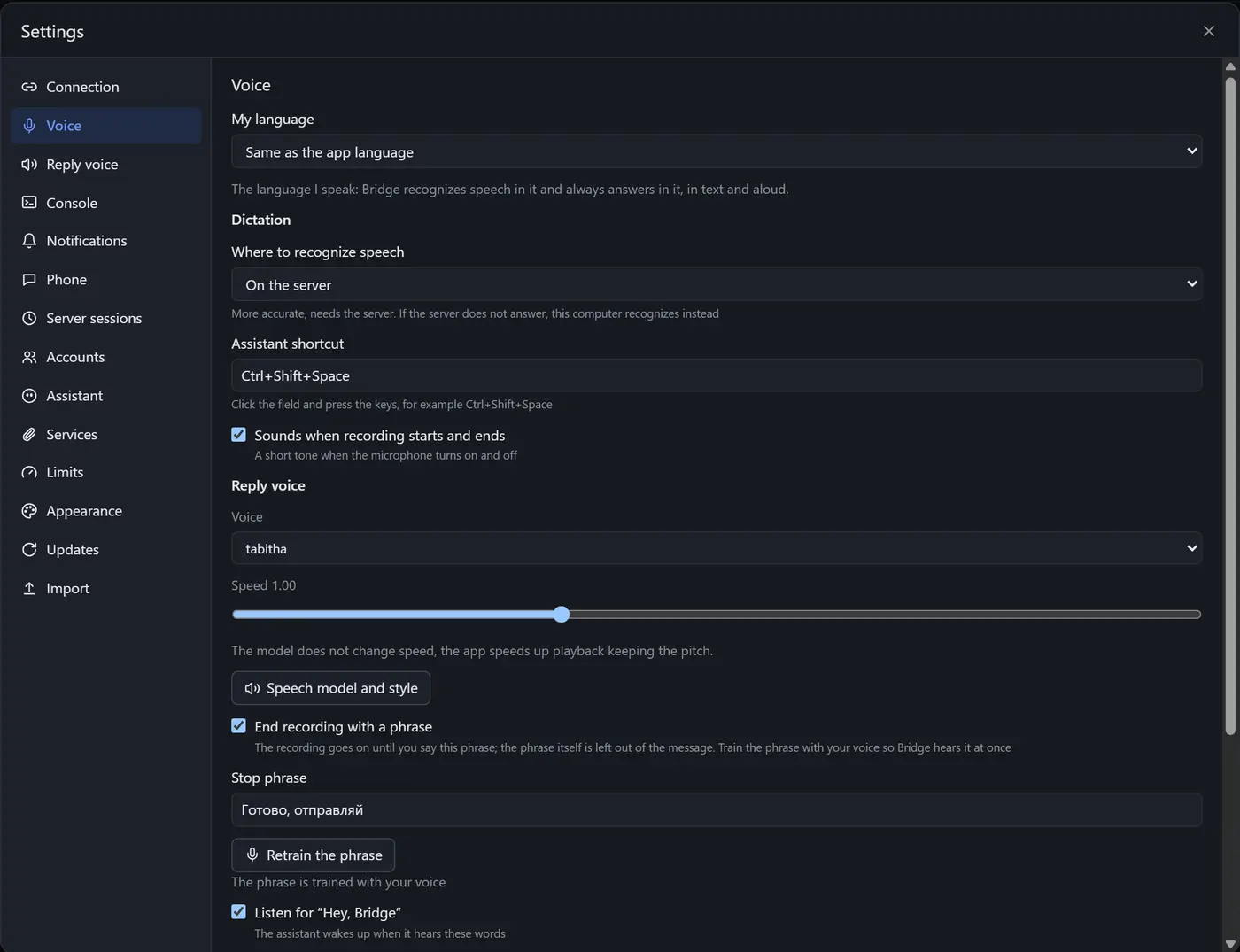
The assistant hears its name, answers out loud and gets things done: reads session status, answers agents, starts tasks. Your hands stay on the keyboard or the coffee cup.
A mic button on every pane. The plane sends, the tick inserts without sending, the cross throws it away.
Talk with pauses, the recording ends on "Done, send it". Train the phrase with your own voice in a minute.
Voice, style and speed change in settings, and Preview lets you hear the choice right away.
Telegram
The question lands in your Telegram group with answer buttons. You decide what is allowed from the phone, one permission at a time.
Yes, no or your own reply. The tapped button goes straight into the session.
Approve permissions for an hour, until the end of the day or always. While on, the window shows a bar with the deadline.
Reply to the bot and it goes into the session as input. /esc, /enter, /stop and documents up to 20 MB.
 Bridge · your sessions
Issue the prepayment receipt now or wait for shipping?
Yes, now
Answer sent to the session
Everything else
Each one came out of real work with agents, ten hours a day.
How much of the 5-hour and weekly Claude limits is used and when they reset, in your local time.
After a reset the app starts the next window with a tiny request. Come in the morning and the reset is already closer.
Claude started by hand shows up in the list. Move it into Bridge with one click and the same history, or start with ab claude.
Restart takes 1 to 3 seconds and every pane comes back. If a new version fails to start, the old one returns.
Up to 10 Claude and Codex sign-ins, picked per session. Each account's usage is shown separately.
Up to 500 prompts, drag one into any terminal, search across past conversations.
A built-in tracker. Drop a task into a terminal and the agent gets it, the task moves to In progress.
Install Gemini, Cursor, Copilot, OpenCode or Qwen on the server with one button, command shown first.
A backup address, automatic reconnects, and a reply cut off by an API error continues without you.
Sessions see their neighbours and the files they edit, and pass short notes without burning your limits.
Ctrl+V uploads the image to the session's server and pastes its path into the terminal.
A session needs you or finished its turn: you get a notification, a click opens the right pane.
Pricing
A subscription to the app. Models run on your own Claude or ChatGPT plan, we do not resell them.
One server and your agents at hand
$10$8per month
$96 billed yearly
Get startedFor people who run several projects every day
$25$20per month
$240 billed yearly
Get startedEvery machine and several accounts
$50$40per month
$480 billed yearly
Get startedPrices in US dollars.
Bring your own AI
AgentsBridge never sits between you and the model. Agents run on your account and your machine.
Claude Pro or Max, ChatGPT for Codex, API keys. Up to 10 accounts per agent.
The hub lives on your server and listens on 127.0.0.1 only. Traffic goes through an SSH tunnel with your key.
Claude Code, Codex, Gemini CLI, Cursor, Copilot, OpenCode, Qwen Code, and a bash, zsh or fish shell.
Runs on

Windows 10 and 11, desktop app.

Apple Silicon Macs, app and server.

x86_64 and ARM64 servers over SSH.
Answer agents from any phone.
FAQ
A server keeps agents running when your laptop sleeps, travels or is offline, and it works from countries where Claude Code is blocked, with no VPN on your computer. Your computer connects to it over SSH.
Any Linux box with SSH, x86_64 or ARM, 2 GB of memory or more. Or an Apple Silicon Mac, including a Mac mini at home. The app installs the hub and tmux itself.
Yes. Your Mac, Mac mini or a Linux machine on your home network can be the server. From Windows, connect to such a machine, and keep the project folder on your computer: the app syncs it both ways.
Yes. The servers button in the title bar keeps every connected machine online. Switching is instant, and each server keeps its own projects, sessions and layout.
Yes. AgentsBridge does not sell model access: agents run on your Claude plan, ChatGPT for Codex, or an API key. The voice assistant uses OpenRouter with the key from settings.
Sessions keep running on the server. Open the app and everything is where you left it, and you can answer an agent from Telegram.
The hub listens on 127.0.0.1 on your server and rejects any request without its token. Traffic goes through an SSH tunnel with your key, nothing is exposed. The token is stored on the server with 0600 permissions.

Download the app, connect a server, and in five minutes your first Claude Code session is writing code.
Windows · Version 0.2.42 · 64 MBmacOS · Version 0.2.37 · 36 MB